Anúncios
Video editing has become an essential skill in today’s digital world, whether you’re creating content for social media, documenting memories, or building a professional portfolio.


The evolution of mobile technology has transformed smartphones into powerful editing studios that fit right in your pocket. Gone are the days when professional video editing required expensive desktop software and hours of technical training. Today’s mobile apps offer intuitive interfaces, professional-grade features, and the flexibility to edit anywhere, anytime.
Anúncios
Whether you’re a beginner looking to enhance your Instagram stories or an experienced content creator aiming to produce YouTube-ready videos, there’s an app designed specifically for your needs. Let’s explore the fascinating world of mobile video editing and discover how these tools can transform your raw footage into compelling visual stories. ✨
Why Mobile Video Editing Apps Have Revolutionized Content Creation 📱
The shift from desktop to mobile video editing represents one of the most significant changes in digital content creation. Mobile apps have democratized video production, making it accessible to everyone regardless of technical background or budget constraints.
Anúncios
Modern smartphones pack impressive processing power, often rivaling computers from just a few years ago. This computational capability, combined with high-quality cameras and intuitive touchscreen interfaces, creates an ideal environment for video editing on the go.
Social media platforms have also played a crucial role in this transformation. With vertical video formats, short-form content, and instant sharing capabilities, mobile editing apps are perfectly positioned to meet the demands of contemporary digital storytelling.
Essential Features to Look for in Video Editing Apps 🎬
Not all video editing apps are created equal. Understanding which features matter most can help you choose the right tool for your specific needs and creative vision.
Timeline and Multi-Layer Editing
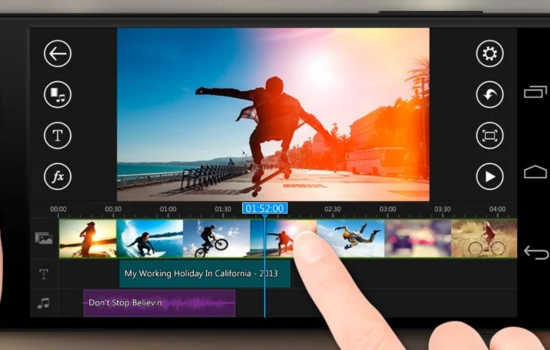
Professional-quality editing requires the ability to work with multiple video clips, audio tracks, and overlay elements simultaneously. A clear, intuitive timeline interface allows you to arrange sequences precisely and maintain creative control over your project’s flow.
Look for apps that support drag-and-drop functionality, pinch-to-zoom for detailed editing, and easy clip splitting or trimming. These features dramatically reduce editing time and make the creative process more enjoyable.
Transitions and Effects Library
Smooth transitions between clips can elevate your video from amateur to professional. Quality editing apps offer a diverse range of transition styles, from simple fades and cuts to dynamic wipes and 3D effects.
Special effects, filters, and color grading tools enable you to establish a consistent visual style and mood throughout your video. The best apps regularly update their libraries with trending effects that resonate with current audiences.
Text and Title Options 📝
Adding text overlays, captions, and animated titles enhances viewer engagement and accessibility. Modern apps provide extensive font libraries, animation presets, and customization options for creating professional-looking text elements.
Consider apps that offer subtitle auto-generation or easy manual captioning tools, especially if you’re creating content for platforms where many viewers watch without sound.
Top Features That Define Professional Video Editing Apps
Beyond the basics, certain advanced features separate good editing apps from exceptional ones. These capabilities enable creators to produce broadcast-quality content directly from their mobile devices.
Audio Editing and Mixing Capabilities 🎵
Sound design is often overlooked but absolutely crucial for engaging videos. Professional apps include audio editing tools like volume adjustment, fade in/out, noise reduction, and multi-track audio mixing.
Access to royalty-free music libraries integrated within the app saves time and ensures your content doesn’t face copyright issues. Look for apps with extensive sound effect collections and the ability to record voiceovers directly within the editing interface.
Speed Control and Time Manipulation
Creating slow-motion sequences or time-lapse effects adds dramatic impact to your storytelling. Advanced apps offer precise speed control, allowing you to adjust playback speed at specific points within a clip rather than uniformly across the entire video.
Reverse playback, freeze frames, and time remapping features provide additional creative possibilities for crafting unique visual narratives.

Chroma Key (Green Screen) Technology 🎥
Green screen functionality has become increasingly accessible in mobile editing apps. This feature allows you to replace backgrounds, transport subjects to different locations, and create special effects previously reserved for professional studios.
Quality chroma key tools include edge refinement, spill suppression, and the ability to use colors other than green for keying. These refinements ensure clean, professional-looking composites even when working with imperfect footage.
User Interface and Learning Curve Considerations
Even the most feature-rich app becomes frustrating if the interface is confusing or counterintuitive. The best video editing apps balance powerful functionality with accessible design.
A well-designed interface organizes tools logically, provides clear visual feedback, and minimizes the number of taps required to access frequently used features. Gesture controls should feel natural, and important functions should be discoverable without extensive menu diving.
Many top-tier apps include built-in tutorials, template libraries, and guided editing modes that help newcomers learn while creating. These resources accelerate the learning process and inspire creativity by demonstrating what’s possible with the platform.
Export Quality and Format Flexibility 💾
Your editing efforts mean nothing if the app can’t export your masterpiece in the format and quality you need. Professional apps offer flexible export settings that balance file size, quality, and compatibility with various platforms.
Look for apps that support 4K resolution export, variable frame rates (24fps for cinematic looks, 60fps for smooth motion), and different aspect ratios (16:9 for YouTube, 9:16 for Instagram Stories, 1:1 for feed posts).
Direct sharing integration with social media platforms streamlines your workflow, allowing you to publish content immediately after finishing edits. Some apps even optimize exports automatically based on your chosen destination platform.
Free vs. Premium: Understanding Pricing Models 💰
Video editing apps employ various monetization strategies, each with distinct advantages and limitations. Understanding these models helps you make informed decisions about which investment makes sense for your needs.
Completely Free Apps
Several capable video editing apps offer their core functionality entirely free. These typically generate revenue through non-intrusive ads or by offering optional premium features as in-app purchases.
Free apps work excellently for casual creators, beginners learning the craft, or anyone producing content occasionally. However, they may include watermarks, limit export resolution, or restrict access to certain effects and music libraries.
Subscription-Based Models
Many professional-grade apps have adopted subscription pricing, typically charging monthly or annual fees. This model ensures continuous development, regular feature updates, and access to expanding content libraries.
Subscriptions make sense for serious content creators who rely on these tools regularly. The ongoing cost is offset by consistent improvements, technical support, and the removal of all usage restrictions.
One-Time Purchase Options
Some apps offer permanent access through a single upfront payment. This approach appeals to users who prefer owning their tools outright without recurring charges.
However, one-time purchase apps may eventually stop receiving updates or charge separately for major version upgrades. Consider your long-term needs when evaluating this pricing structure.
Optimizing Your Mobile Editing Workflow ⚡
Efficiency matters when creating content regularly. Developing a streamlined workflow transforms video editing from a time-consuming chore into an enjoyable creative process.
Start by organizing your raw footage before opening your editing app. Delete unusable clips, rename important files, and group related content. This preparation saves significant time during the actual editing phase.
Learn keyboard shortcuts and gesture controls specific to your chosen app. These seemingly small efficiency gains compound dramatically over multiple projects, potentially saving hours each month.
Create templates for recurring video types. If you produce similar content regularly—like weekly vlogs or product reviews—templates with pre-configured titles, transitions, and effects dramatically reduce editing time.
Hardware Considerations for Mobile Video Editing 📲
While apps matter tremendously, the device running them significantly impacts your editing experience. Understanding hardware limitations helps you choose appropriate apps and set realistic expectations.
Processing power determines how smoothly your app handles high-resolution footage and complex effects. Newer devices with current-generation processors handle 4K editing effortlessly, while older phones may struggle with demanding projects.
Storage capacity becomes critical when working with video files, which consume substantial space. Consider devices with expandable storage or regularly transfer completed projects to cloud storage or external drives.
Display quality affects your ability to judge colors, exposure, and visual details accurately. Phones with high-resolution, color-accurate screens provide better editing precision, though most modern smartphones perform adequately for mobile content creation.
Popular Video Formats and Their Applications 🎞️
Understanding video formats helps you choose appropriate export settings and ensures compatibility with your intended platforms and audiences.
MP4 remains the most universally compatible format, working across virtually all devices, platforms, and media players. Its excellent balance of quality and file size makes it the default choice for most mobile video projects.
MOV files, developed by Apple, offer exceptional quality and work seamlessly within the Apple ecosystem. They’re ideal when transferring projects between iOS devices or when maximum quality preservation matters more than file size.
For social media content, many apps offer platform-specific export presets that automatically configure resolution, aspect ratio, and compression settings optimally for services like Instagram, TikTok, or YouTube.
Creative Techniques for Standout Video Content ✨
Technical proficiency with editing apps is just the foundation. Applying creative techniques elevates your videos from technically competent to genuinely compelling.
Dynamic Pacing and Rhythm
Varying shot lengths creates visual rhythm that maintains viewer interest. Quick cuts generate energy and excitement, while longer shots allow emotional moments to breathe and resonate.
Match your editing pace to your content’s mood. Action sequences benefit from rapid cuts synchronized to music beats, while thoughtful interviews require measured pacing that respects natural conversation flow.
Color Grading for Mood and Atmosphere 🎨
Color grading profoundly impacts how audiences emotionally respond to your content. Warm tones create inviting, nostalgic feelings, while cool colors convey professionalism, calmness, or melancholy.
Consistency matters tremendously. Establishing a signature color palette across your content builds brand recognition and visual cohesion. Many successful creators develop distinctive looks that make their work instantly recognizable.
Strategic Use of B-Roll Footage
B-roll—supplementary footage that supports your main narrative—adds visual interest and professional polish. Instead of showing a talking head continuously, cutting to relevant images, locations, or activities maintains engagement.
Plan B-roll shots intentionally rather than treating them as afterthoughts. Purposeful supplementary footage transforms simple videos into rich, layered stories that captivate audiences.
Troubleshooting Common Mobile Editing Challenges 🔧
Even with excellent apps and powerful devices, editors occasionally encounter technical difficulties. Understanding common issues and their solutions prevents frustration and wasted time.
App Crashes and Stability Issues
Frequent crashes typically indicate insufficient device memory or storage space. Close background apps, delete unnecessary files, and restart your device before major editing sessions.
If crashes persist with specific projects, try breaking them into smaller segments. Extremely long or complex timelines can overwhelm even capable devices, so dividing work into manageable sections improves stability.
Export Failures and Quality Loss
Failed exports often result from insufficient storage space. Always ensure you have at least twice the free space as your project’s estimated export size.
Visible quality degradation after export usually stems from inappropriate compression settings. Experiment with higher bitrate exports or different file formats if quality doesn’t meet your standards.
Audio-Video Synchronization Problems
Sync issues commonly arise when mixing footage from different sources or frame rates. Most apps include synchronization tools that can automatically align clips, or you can manually adjust timing on the timeline.
Recording separate, high-quality audio and syncing it in post-production delivers superior results compared to relying solely on phone microphones. Many editing apps include features specifically designed to simplify this professional technique.
Future Trends in Mobile Video Editing Technology 🚀
The mobile editing landscape continues evolving rapidly, with emerging technologies promising even more powerful creative capabilities.
Artificial intelligence is revolutionizing editing workflows through automated features like intelligent scene detection, automatic video summarization, and AI-powered color matching. These tools handle tedious tasks, freeing creators to focus on storytelling and creative decisions.
Augmented reality integration is becoming more sophisticated, allowing editors to incorporate 3D objects, interactive elements, and immersive effects directly within their mobile workflows. This technology blurs the line between traditional video and interactive experiences.
Cloud-based collaboration features enable multiple creators to work on projects simultaneously from different locations. Real-time co-editing, comment systems, and version control bring team workflows previously limited to professional studios into mobile environments.
Building Your Video Editing Skills Progressively 📚
Mastering video editing is a journey, not a destination. Approaching skill development strategically accelerates your growth and maintains motivation through inevitable challenges.
Start with simple projects that focus on fundamental techniques like basic cuts, transitions, and audio balancing. Completing straightforward videos builds confidence and establishes essential workflows before tackling complex projects.
Study content you admire analytically. Watch videos from successful creators with a critical eye, noting their editing choices, pacing decisions, and how they structure narratives. Reverse-engineering effective content provides invaluable learning.
Accept that early work won’t be perfect. Every accomplished creator started as a beginner, and improvement comes through consistent practice and experimentation. Focus on incremental progress rather than immediate perfection.
Engage with editing communities online. Forums, social media groups, and tutorial channels offer support, inspiration, and solutions to specific challenges. Learning from others’ experiences accelerates your development significantly.
Maximizing Engagement Through Strategic Video Editing 📊
Technical proficiency means little if your videos fail to capture and retain audience attention. Strategic editing choices directly impact viewer engagement metrics and content performance.
Hook viewers immediately with compelling opening seconds. Modern audiences decide whether to continue watching within moments of starting a video. Lead with your most interesting content, intriguing questions, or stunning visuals to prevent immediate abandonment.
Maintain momentum throughout by eliminating dead space, awkward pauses, and unnecessary content. Every second should serve a purpose—advancing your narrative, providing valuable information, or entertaining your audience.
Include clear calls-to-action encouraging viewers to like, comment, subscribe, or visit external links. Strategic placement of these prompts, typically mid-video and at the conclusion, significantly improves conversion rates without annoying audiences.
Analyze performance metrics for completed videos to understand what resonates with your specific audience. Retention graphs show exactly when viewers lose interest, informing future editing decisions and content structure.
Transforming Your Creative Vision Into Reality 🎭
The best video editing app is ultimately the one that empowers you to realize your unique creative vision efficiently and enjoyably. Technical specifications matter, but they’re meaningless without the inspiration and determination to create meaningful content.
Modern mobile editing tools have removed virtually all barriers between creative ideas and finished videos. Whether you’re documenting family memories, building a social media presence, or launching a video marketing strategy, powerful editing capabilities literally fit in your pocket.
Start creating today. Download an app, import some footage, and begin experimenting. Each project teaches valuable lessons, and consistent practice transforms technical skills into intuitive creative expression. Your stories deserve to be told, and the tools to tell them beautifully have never been more accessible.
The mobile video editing revolution isn’t coming—it’s already here, reshaping how content gets created, shared, and consumed globally. By embracing these powerful tools and continuously developing your skills, you position yourself at the forefront of this exciting creative frontier. 🌟
