
Anúncios
Measuring the world around us has never been easier thanks to innovative mobile applications that turn your smartphone into a powerful measurement tool.
Whether you’re a professional contractor, an interior designer, a DIY enthusiast, or simply someone who needs to measure something quickly, measurement apps have revolutionized how we approach everyday tasks. These digital tools leverage advanced technologies like augmented reality (AR), camera sensors, and GPS to deliver accurate measurements without traditional tools.
Anúncios
Gone are the days when you had to carry bulky tape measures, rulers, or laser distance meters everywhere. Today’s smartphones come equipped with sophisticated sensors and cameras that, when paired with intelligent software, can measure distances, heights, areas, and even angles with remarkable precision. Let’s explore how these applications work and why they’ve become essential tools for millions of users worldwide.
📱 How Measurement Applications Actually Work
Modern measurement apps utilize several technologies embedded in your smartphone to calculate distances and dimensions. The primary technology behind most measurement apps is augmented reality combined with advanced computer vision algorithms. When you point your camera at an object, the app analyzes the visual data and uses reference points to calculate measurements.
Anúncios
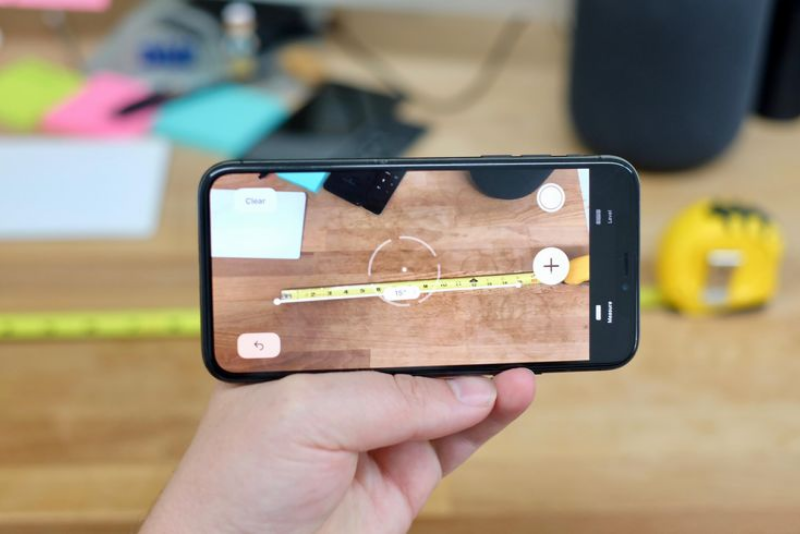
The process typically involves identifying surfaces and planes within the camera’s field of view. The app creates a virtual grid overlay on real-world surfaces, allowing it to calculate distances between points. Some applications use the device’s accelerometer and gyroscope to determine the phone’s orientation and movement, which helps refine measurement accuracy.
Another technology employed by these apps is LiDAR (Light Detection and Ranging), available on newer smartphone models. LiDAR sensors emit light pulses and measure how long they take to bounce back, creating precise depth maps of the environment. This technology significantly enhances measurement accuracy, especially for complex shapes and larger distances.


🎯 Key Features That Make Measurement Apps Indispensable
The best measurement applications offer a comprehensive suite of features that go far beyond simple distance calculation. Understanding these capabilities helps users maximize the value they get from these digital tools.
Distance and Length Measurement
The most fundamental feature is the ability to measure linear distances between two points. Users simply tap on their screen to set a starting point and an endpoint, and the app calculates the distance instantly. This feature works for both horizontal and vertical measurements, making it versatile for various scenarios.
Area and Volume Calculation
Advanced measurement apps can calculate the area of rectangular or irregular surfaces by measuring multiple points and computing the total space. Volume calculation extends this capability to three-dimensional spaces, perfect for determining room capacity or shipping package dimensions.
Height Measurement
One particularly useful feature is the ability to measure the height of objects or people without physically reaching the top. The app uses the phone’s position and angle to calculate vertical distances, making it ideal for measuring ceiling heights, furniture, or even trees.
Angle Measurement
Professional applications include protractor functionality that measures angles with precision. This feature benefits carpenters, architects, and anyone working with angles in construction or design projects.
🏗️ Real-World Applications Across Different Industries
Measurement apps have found their way into numerous professional and personal contexts, transforming workflows and improving efficiency across multiple sectors.
Construction and Architecture
Contractors and architects use measurement apps for quick on-site assessments, initial space planning, and verification measurements. These tools help create preliminary estimates, check dimensions before ordering materials, and document project progress with annotated photos showing measurements.
Interior Design and Decoration
Interior designers rely on measurement apps to assess spaces, plan furniture arrangements, and ensure new pieces will fit properly in a room. The ability to measure and visualize spaces helps clients make better decisions and reduces costly ordering mistakes.
Real Estate
Real estate agents utilize these applications to quickly determine room sizes, property dimensions, and outdoor spaces during property showings. This information helps create accurate listings and answers buyer questions on the spot without scheduling additional visits.
DIY and Home Improvement
Home improvement enthusiasts benefit enormously from having instant measurement capabilities. Whether hanging pictures, building shelves, or planning renovations, measurement apps eliminate the need to search for physical measuring tools and speed up project planning.
🔍 Accuracy Considerations and Best Practices
While measurement apps offer impressive functionality, understanding their limitations and following best practices ensures optimal results. The accuracy of digital measurements depends on several factors that users should consider.
Lighting conditions significantly affect measurement precision. Apps that rely on camera vision perform best in well-lit environments where surfaces and edges are clearly visible. Poor lighting can cause the software to misidentify reference points, leading to inaccurate measurements.
Device capability plays a crucial role in measurement quality. Smartphones with better cameras, more advanced processors, and specialized sensors like LiDAR deliver superior accuracy compared to older or budget devices. Understanding your device’s capabilities helps set realistic expectations.
For critical measurements where precision is paramount, it’s advisable to take multiple readings and compare results. Moving slightly and remeasuring helps identify potential errors and ensures consistency. Professional projects requiring exact specifications should still use traditional measuring instruments for verification.
💡 Maximizing Your Measurement App Experience
Getting the most value from measurement applications requires understanding how to use them effectively and knowing when they’re the right tool for the job.
Calibration Techniques
Many measurement apps allow calibration using known distances or objects. Taking time to calibrate your app using a physical ruler or tape measure improves accuracy for subsequent measurements. Regular calibration, especially after app updates or phone restarts, maintains consistency.
Steady Hand and Stable Positioning
Keeping your phone steady during measurements significantly improves accuracy. Some apps offer stabilization features, but maintaining a firm grip and using both hands when possible produces better results. For precise work, consider using a smartphone tripod or leaning against a stable surface.
Understanding Measurement Units
Quality measurement apps support multiple unit systems including metric (meters, centimeters) and imperial (feet, inches). Familiarize yourself with unit conversion features and default settings to avoid confusion and ensure measurements match your project requirements.
🌟 Comparing Different Measurement App Technologies
The market offers various measurement app approaches, each with distinct advantages and ideal use cases. Understanding these differences helps users select the right tool for their needs.
| Technology | Accuracy Level | Best Use Case | Device Requirements |
|---|---|---|---|
| AR-Based Measurement | Moderate to High | General purpose measuring | Modern smartphone camera |
| LiDAR Technology | Very High | Professional applications | LiDAR-equipped devices |
| Photo Ruler | Moderate | Small object measurement | Any camera phone |
| GPS-Based | Low to Moderate | Large outdoor distances | GPS-enabled smartphone |
🚀 Advanced Features Transforming the Measurement Experience
Modern measurement applications continue evolving, incorporating innovative features that expand their utility and improve user experience beyond basic measurement capabilities.
Photo Annotation and Documentation
Many apps allow users to capture photos with measurements embedded directly in the image. This documentation feature creates valuable records for projects, enables easy sharing with colleagues or clients, and provides reference material for future work.
Floor Plan Creation
Advanced applications can generate floor plans by measuring walls and room dimensions sequentially. Users walk around a space, measuring each wall, and the app automatically creates a scaled floor plan diagram, complete with measurements and room labels.
3D Modeling Capabilities
Cutting-edge measurement apps with 3D scanning features create three-dimensional models of spaces or objects. These models can be exported to design software, shared with others, or used for virtual walkthroughs, opening possibilities for remote collaboration and planning.
Cloud Synchronization
Cloud integration allows measurements and projects to sync across multiple devices, ensuring data is never lost and can be accessed anywhere. This feature particularly benefits professionals who work from multiple locations or collaborate with team members.
🎓 Learning Curve and User Accessibility
One of the greatest advantages of measurement apps is their intuitive design and minimal learning curve. Most applications feature clean interfaces with straightforward controls that new users can master within minutes.
Tutorial modes and guided walkthroughs help first-time users understand core functionality quickly. Interactive demonstrations show how to position the camera, select measurement points, and interpret results, ensuring confidence from the first measurement.
Accessibility features make measurement apps usable for diverse audiences, including people with varying technical skills and physical abilities. Voice commands, high-contrast modes, and adjustable interface sizes accommodate different user needs and preferences.
💰 Cost Considerations and Value Proposition
Measurement applications range from completely free options with basic features to premium versions offering advanced capabilities. Understanding the pricing landscape helps users make informed decisions about which app provides the best value for their specific needs.
Free measurement apps typically include essential features like basic distance measurement and simple area calculation. These versions often display advertisements or include watermarks on exported images but provide sufficient functionality for occasional users and simple projects.
Premium versions eliminate ads and unlock advanced features like unlimited measurements, cloud storage, professional reporting tools, and priority customer support. For professionals who use measurement apps regularly, the investment often pays for itself quickly through improved efficiency and time savings.
Subscription models provide ongoing access to new features and updates, ensuring the app remains compatible with evolving smartphone technologies and operating system changes. One-time purchase options appeal to users who prefer traditional software ownership without recurring payments.
🔒 Privacy and Data Security Considerations
When using measurement apps, especially in professional contexts, understanding how these applications handle data is essential for maintaining privacy and security standards.
Reputable measurement apps clearly explain what information they collect and how it’s used. Most applications require camera access to function but should request permissions transparently and only when necessary. Review app permissions before installation to ensure they align with your comfort level.
Photos containing measurements might include sensitive information about properties, projects, or business operations. Choose apps that offer local storage options or encrypted cloud backup to protect confidential data. Avoid sharing measurement data through unsecured channels or public networks.
🌐 The Future of Digital Measurement Technology
The trajectory of measurement app development points toward even more sophisticated capabilities and seamless integration with other technologies. Emerging trends suggest exciting possibilities on the horizon.
Artificial intelligence integration will enable apps to automatically identify objects and suggest appropriate measurement techniques. Machine learning algorithms will improve accuracy by learning from user corrections and adapting to different environments and use cases.
Augmented reality will become more sophisticated, allowing users to visualize how objects will fit in spaces before purchasing or installing them. Virtual furniture placement and realistic size comparisons will help eliminate guesswork from buying decisions.
Integration with smart home systems and IoT devices will create ecosystems where measurement data automatically informs other applications. Imagine measuring a window and having that information instantly available when shopping for curtains online, or measuring a room and receiving automated furniture arrangement suggestions.
✅ Making the Right Choice for Your Measurement Needs
Selecting the ideal measurement app depends on your specific requirements, frequency of use, and the level of precision your projects demand. Consider these factors when evaluating different options.
- Intended Use: Casual home projects require different features than professional construction work
- Device Compatibility: Ensure the app supports your smartphone model and operating system version
- Feature Requirements: Identify which capabilities are essential versus nice-to-have for your typical tasks
- User Reviews: Read experiences from users in similar fields or with comparable needs
- Developer Support: Active development and regular updates indicate reliable long-term functionality
- Accuracy Requirements: Match the app’s precision capabilities with your project tolerances
🎯 Practical Tips for Professional Results
Achieving professional-quality measurements with smartphone apps requires technique, patience, and understanding of best practices that separate casual users from power users.
Always verify critical measurements using multiple methods. Cross-referencing app measurements with physical tools for important projects provides confidence and catches potential errors before they become costly mistakes. Think of measurement apps as excellent screening tools that streamline workflow while reserving traditional instruments for final verification.
Document your measurement process by taking photos and notes about conditions, settings, and any factors that might affect accuracy. This documentation proves valuable when reviewing projects later or explaining measurements to clients and collaborators.
Experiment with different angles and distances when measuring the same object. Some measurements become more accurate when captured from specific positions or distances. Understanding these nuances through practice improves overall measurement quality.
🌟 Embracing the Digital Measurement Revolution
Measurement applications represent a significant leap forward in accessibility and convenience for everyday and professional measuring tasks. These tools democratize precision measurement, putting powerful capabilities in everyone’s pocket regardless of their technical expertise or budget for specialized equipment.
The continuous improvement of smartphone sensors, combined with advancing software algorithms, means measurement apps will only become more capable and accurate over time. Early adoption and regular practice position users to take full advantage of these evolving capabilities.
Whether you’re measuring a picture frame for your living room, planning a major renovation, or conducting professional assessments, today’s measurement apps provide reliable assistance that simplifies tasks and saves time. The key is choosing the right app, understanding its capabilities and limitations, and developing skills through consistent use.
By integrating measurement apps into your regular workflow, you’ll discover countless situations where instant measurement capability proves invaluable. From settling friendly debates about distances to making confident purchasing decisions, these digital tools have earned their place as essential smartphone applications for modern life. 📐
